Showing posts with label Blogger. Show all posts

1 HOW TO CREATE A RECENT COMMENTS WIDGET

A blog/website without a good quality comment is like eating without drinking. But it is not easy to encourage your reader to give comment on your blog therefore you need to encourage them to do so by creating "Recent Comment" and place it on your front page.

The function of a "Recent Comment" is not just to encourage your reader to leave a comment to your post but it also help you to increase your page view.

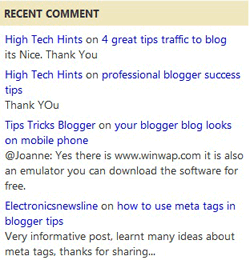
This recent comment use JavaScript. Checkout this picture bellow


0 SOCIAL MONKEE : AUTOMATED FREE BACKLINKING TOOL


Building backlinks to your pages is an essential part of SEO (short for Search Engine Optimization) for two reasons. The first reason is that it helps your pages get indexed faster, which is very important because you want the search engines to find them as soon as possible and crawl them regularly. The second reason is that it helps your pages get higher search engine rankings for the keywords of your choice. The more backlinks you have, the better. Period.

However, building backlinks can be a time-consuming, boring process. You can outsource the process to an agency and pay a lot of money... Or you can do it yourself with SocialMonkee! SocialMonkee is an instant backlink builder allowing you to build 25 unique backlinks, every day, FREE! All links are on unique C-Class IP addresses and domains. Imagine being able to create 25 unique backlinks every day, with the click of a button, FREE! Well, you can stop imagining...

So, 25 unique backlinks every day... That's a total of 175 backlinks every week, 750 every month. If you upgrade, you will be able to build 100 uniques backlinks, 3 times a day! That's a total of 2,100 backlinks every week, 9,000 every month! The good news is... you can get a Premium Account, FREE! All you need to do is to refer 12 members, and your account will automatically be upgraded. If you're not really into referral marketing, you may upgrade right now for a low one-time fee.

Submitting a page to SocialMonkee via the members area takes under two minutes, but there's an even faster way! They created a Firefox plugin that allows you to submit your page to up to 100 sites in just a few clicks, using nothing else than Firefox! If you have a Premium Account you will also get access to link reports and RSS feeds, which are great to keep track of your backlinks and get them indexed fast. Submitting your RSS feeds to RSS submitters is actually a very important step in link building.

2 ADSENSE GUIDE TO PROFIT

Do you know that almost every big blog or big site have the same adsense secret? If you don't know yet, today I would like to reveal some of the tips and tricks that I found and believe to be the secrets of adsense, something that I discovered on the net.

What is adsense? Adsense is the most popular Google ad serving application where site owners will gain revenue when they enable Google to run ad campaign on their site. Website owners will gain revenue based on ppc (paid per click) is when visitor clicks Google adsense on your site.

If you have join with adsense in 2001 and had monetized your site with adsense back then you probably will not have to face any problem as you are now in 2011. Since there are not many people who know about adsense and there are also less competitors on your niche.

But in 2011 and there are millions of adsense publisher out there and also millions of niche it quite difficult for you to compete. Nonetheless there is a behavior that exist among people on the net that is not good for adsense publisher that is call ad blind.

Ad blind mean that visitor that don't bother looking at ad don't like ad. Most of them who have this kind of behavior are the adsense publisher themselves (including me), web master, web designer,web developer and people who knows about adsense.

Therefor I hope these adsense secret tips and tricks will really help you to increase your adsense revenue by increasing your CTR, and CPC.

0 HOW TO CREATE A PAGE LOADING ANIMATION (FLASH)

Page loading animation is necessary when a blog can not load fast. On page loadind there will be an animation with an explanation that the is still loading that you need to wait for a moment until loading process is complete and loading animation disappear.

This animation is useful to keep your reader to stay and wait until loading process complete and browser your blog.

This helps your visitor/viewers to know that the page that they are viewing is still loading.

Follow the steps below on how you can install it on your own blogs/websites. :)

  • Open Blogger
  • Go to Design
  • Click Edit HTML
  • Tick the Expand Template Widgets
  • Save your template in order for you to have a backup copy, just incase your theme didn't work you can undo it by installing the previous template.
  • Open Notepad create a text file then paste the code below.

0 HOW TO GET APPROVED BY ANY BLOG REVIEW SERVICES

Sponsor review is another way for blogger to make money from their blog. There are many sponsors review services there on the net that connect advertiser to get their blog review by blogger and blogger that want to monetize their blog. 

I write these steps bellow so you can get your blog approved by blog review services.

Here are some blog review services that you can apply to monetize your blog such as buyblogreview, sponsored review and reviewme.

Here are the requirements that your blogs must possess in order for you to be accepted by any blog review services.


Minimum Content
Many sponsor review services will only accept blog that already have many content. It is best if& your blog already have minimum 60 content. Buy blog review team will consider that you are serious in blogging, but if you have really quality content then probably you can get approved even though you have less than 60 contents.

0 HOW TO PLACE AN IMAGE OR PHOTO ON A WEBPAGE

HOW TO PLACE AN IMAGE OR PHOTO ON A WEBPAGE

As we all know, uploading an image on any website is easy for example in Blogger all you need to do is simply when you want to post an image on your post you can use the "Insert Image" button on your Blogger Post Editor, using this tool makes your blogging as easy as eating a banana. :)

However you need some technical knowledge on HTML CODES to better customize anything from your Blogger Blog.

Now, I will teach you how to upload or insert an image using HTML CODE to adjust and optimize according to your needs.

Before we start you need first an image to upload which is obvious. ^_^ next is to choose a free image hosting site. I suggest the following for you:

0 HOW TO ADD A SOCIAL BOOKMARKING BUTTON


Hello there this is me again your Eazy Blogger Tricker, :) and now I'm here to teach how to "ADD A SOCIAL BOOKMARKING TOOL" which enables your visitors to share your blog posts and other stuffs they might find interesting to major social networking sites such as "Facebook", "Twitter", "Myspace", "Digg", "Blogger" and many more.

By placing this very useful "social bookmarking tool" to your blog will you will be able to share and also your visitors to drive free traffic to your blogs and websites.

With this tutorial I'm gonna introduce to you the famous social bookmarking tool named.

Addtoany

What is AddToAny?

Addtoany.com is a domain used by AddToAny which is an widget company that is part of a network of sites, cookies, and other technologies used to track you, what you do and what you click on, as you go from site to site, surfing the Web. 

Over time, sites like addtoany.com can help make an online profile of you usually including the sites you visit, your searches, purchases, and other behavior. 

Your profile can then be exchanged and sold between various companies like addtoany.com as well as being sold to other advertisers and marketers.

0 HOW TO CREATE A COMMENTS COUNTER BUTTON


Hello there its me again ^_^ and I'm here to teach you how to create your own 

"COMMENTS COUNTER BUTTON"

A "Comment Counter Button" (BUBBLE) is a special button that encourage your visitors to participate and comment on your blog post and also helps to create a create feedback and credibility on your post.

Installing this Blogger hack to add a comment counter button only takes a few minutes. The changes needed to add the comment bubble to Blogger while not difficult do involve adding a small snippet of code to your Blogger template in two places. 

"For this reason I strongly urge you to back up your Blogger template before attempting this blogger hack."


"STEPS ON HOW TO ADD A COMMENT COUNTER BUTTON"

Just simply follow the step-by-step guide in order for you to execute the right way on installing this blogger hack. Upon doing this you will be able to create a fully clickable comments counter button as the same line as the post title in your blogger blog and the alignment of the "bubble counter" will be aligned right by default. :)

0 HOW TO CREATE A FLASH TAG CLOUD (BLOGUMUS)


BLOGUMUS

"Blogumus" is an Flash based tag cloud widget which uses scripts converted from Roy Tanck's WP Cumulus plugin for Wordpress. I fell in love with Roy's original Cumulus plugin when I saw it, and simply had to learn how to convert this for use in Blogger powered blogs

In this tutorial you will be able to place your own "BLOGUMUS" tag cloud on your "BLOGGER" blog.

This widget uses a combination of JavaScript and Flash animation to parse and display your blog labels. Once installed in your template, it should work "out of the box" without any additional tweaking required, though of course you may prefer to change the variables for color, background and size if appropriate.

 You should also be able to move the Label Cloud widget through the Page Elements page of your dashboard if you prefer display in a different layout location. 

To see Blogumus in action, both Flash and Javascript must be installed and enabled for your internet browser. However, it does degrade relatively gracefully, and label links will still be clickable (though not animated) for those who do not use JavaScript of Flash (including search engine spiders).


*HOW TO INSTALL BLOGUMUS IN YOUR BLOGGER LAYOUT*

Installing Blogumus in your Blogger layout is surprisingly simple! You should only need to copy and paste a section of code to your Blogger template, though any tweaks for the style of display will require some manual editing. Here are the steps required to install Blogumus in your Blogger layout:

back to top