Showing posts with label Widget. Show all posts

1 HOW TO CREATE A RECENT COMMENTS WIDGET

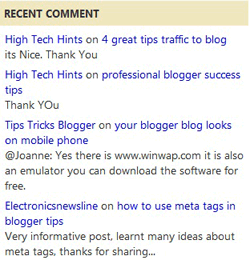
A blog/website without a good quality comment is like eating without drinking. But it is not easy to encourage your reader to give comment on your blog therefore you need to encourage them to do so by creating "Recent Comment" and place it on your front page.

The function of a "Recent Comment" is not just to encourage your reader to leave a comment to your post but it also help you to increase your page view.

This recent comment use JavaScript. Checkout this picture bellow


0 HOW TO ADD A SOCIAL BOOKMARKING BUTTON


Hello there this is me again your Eazy Blogger Tricker, :) and now I'm here to teach how to "ADD A SOCIAL BOOKMARKING TOOL" which enables your visitors to share your blog posts and other stuffs they might find interesting to major social networking sites such as "Facebook", "Twitter", "Myspace", "Digg", "Blogger" and many more.

By placing this very useful "social bookmarking tool" to your blog will you will be able to share and also your visitors to drive free traffic to your blogs and websites.

With this tutorial I'm gonna introduce to you the famous social bookmarking tool named.

Addtoany

What is AddToAny?

Addtoany.com is a domain used by AddToAny which is an widget company that is part of a network of sites, cookies, and other technologies used to track you, what you do and what you click on, as you go from site to site, surfing the Web. 

Over time, sites like addtoany.com can help make an online profile of you usually including the sites you visit, your searches, purchases, and other behavior. 

Your profile can then be exchanged and sold between various companies like addtoany.com as well as being sold to other advertisers and marketers.

0 HOW TO CREATE A COMMENTS COUNTER BUTTON


Hello there its me again ^_^ and I'm here to teach you how to create your own 

"COMMENTS COUNTER BUTTON"

A "Comment Counter Button" (BUBBLE) is a special button that encourage your visitors to participate and comment on your blog post and also helps to create a create feedback and credibility on your post.

Installing this Blogger hack to add a comment counter button only takes a few minutes. The changes needed to add the comment bubble to Blogger while not difficult do involve adding a small snippet of code to your Blogger template in two places. 

"For this reason I strongly urge you to back up your Blogger template before attempting this blogger hack."


"STEPS ON HOW TO ADD A COMMENT COUNTER BUTTON"

Just simply follow the step-by-step guide in order for you to execute the right way on installing this blogger hack. Upon doing this you will be able to create a fully clickable comments counter button as the same line as the post title in your blogger blog and the alignment of the "bubble counter" will be aligned right by default. :)

0 HOW TO CREATE A FLASH TAG CLOUD (BLOGUMUS)


BLOGUMUS

"Blogumus" is an Flash based tag cloud widget which uses scripts converted from Roy Tanck's WP Cumulus plugin for Wordpress. I fell in love with Roy's original Cumulus plugin when I saw it, and simply had to learn how to convert this for use in Blogger powered blogs

In this tutorial you will be able to place your own "BLOGUMUS" tag cloud on your "BLOGGER" blog.

This widget uses a combination of JavaScript and Flash animation to parse and display your blog labels. Once installed in your template, it should work "out of the box" without any additional tweaking required, though of course you may prefer to change the variables for color, background and size if appropriate.

 You should also be able to move the Label Cloud widget through the Page Elements page of your dashboard if you prefer display in a different layout location. 

To see Blogumus in action, both Flash and Javascript must be installed and enabled for your internet browser. However, it does degrade relatively gracefully, and label links will still be clickable (though not animated) for those who do not use JavaScript of Flash (including search engine spiders).


*HOW TO INSTALL BLOGUMUS IN YOUR BLOGGER LAYOUT*

Installing Blogumus in your Blogger layout is surprisingly simple! You should only need to copy and paste a section of code to your Blogger template, though any tweaks for the style of display will require some manual editing. Here are the steps required to install Blogumus in your Blogger layout:

back to top